S4U Assen - Hybrid watch face
styles4youPersonalization
4.5101.00 Reviews
- Version
- Varies With Device
- Installs
- 100.00K
- Age Rating
- Everyone
Screenshots
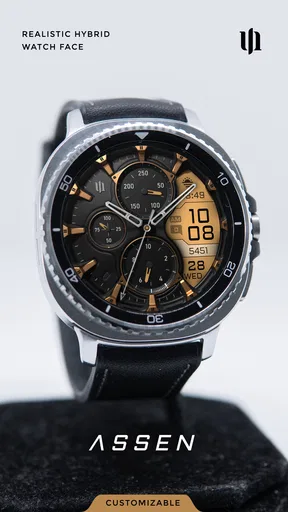
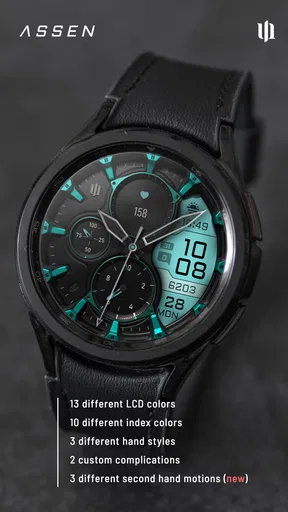
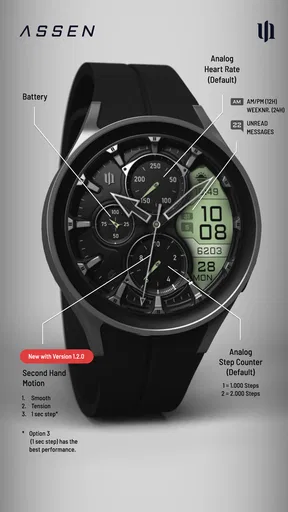
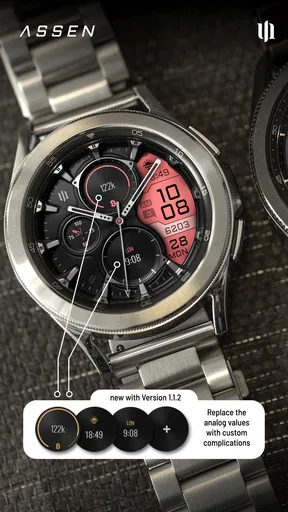
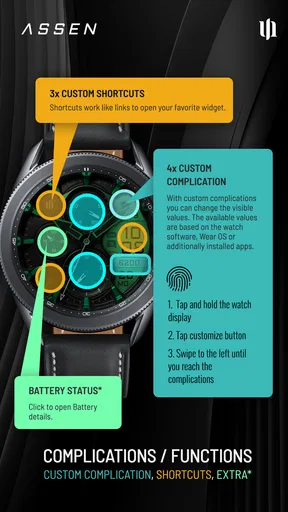
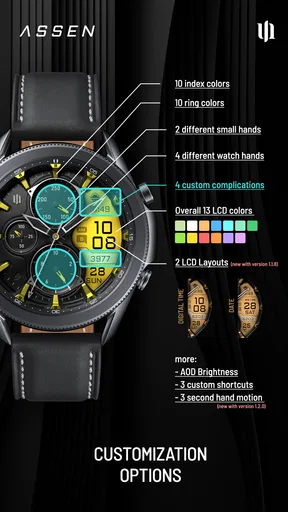
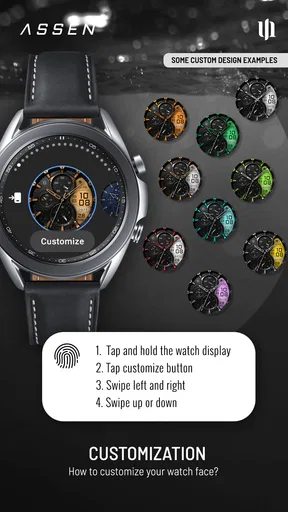
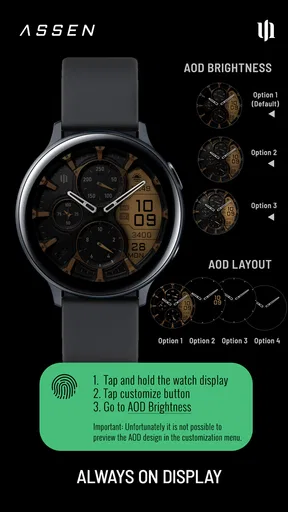
Our Review of S4U Assen - Hybrid watch face
 Analysis by Appyee
I’d approach S4U Assen - Hybrid Watch Face as a watch-face purchase rather than a full smartwatch companion app. Its appeal is the mix of an analogue-inspired look and digital information, with customization to make the layout feel more personal. If you’re new to changing watch faces, the first useful goal is simple: install it, get it onto your watch, and make sure the time and the information you care about are easy to read at a glance.
What to expect from a hybrid look
A hybrid face is a practical middle ground: it aims to keep the familiar character of a traditional dial while making room for smartwatch details. That balance is the main reason I’d consider this design over a plain digital face. It can suit someone who wants a watch to look considered at work or out for the day, but still wants a quick glance at useful details rather than opening an app on the watch.
The trade-off is that a more detailed face can feel busy if you prefer a clean dial. Before changing every available setting, I’d wear the default arrangement for a little while and notice where my eyes naturally go. If the time is immediately clear and the smaller details remain secondary, the design is doing its job. If I find myself squinting or scanning, simplifying the face is more valuable than adding another item.
Who is likely to enjoy it
This is a good fit for people who enjoy tailoring the appearance of a watch and want something less bare than a basic time-only face. It may also appeal if you switch between casual and smarter outfits and would rather adjust a watch face than keep several interchangeable designs in rotation. styles4you makes personalization-focused watch faces, and this one is aimed at people who want visual character alongside everyday glanceability.
I’d be less enthusiastic if I wanted an uncluttered display above everything else, or if I never change the look of my watch once it is set up. In that case, a simple built-in face may be easier and entirely sufficient. Likewise, anyone expecting a watch face to replace a dedicated fitness or weather app should keep expectations modest: a face is best treated as a quick summary, not a deep dashboard.
Getting through the first setup
After installing it, look for the face in the watch’s face selection options and apply it there; the phone app and the watch face have different roles. The phone is where you make available adjustments, while the watch is where you judge whether the finished layout is comfortable to use. If the face does not appear immediately, give the installation and watch connection a moment, then check the watch’s face picker again rather than repeatedly changing settings.
For a first pass, change one thing at a time. Choose a color or layout that makes the time easy to distinguish, then check the result on your wrist in the lighting where you normally use your watch. A setting that looks attractive on a phone screen may be harder to read outdoors or while walking. This small test saves the frustration of making several changes and then not knowing which one made the display less clear.
A realistic first win
My first meaningful success would be setting the face up for a normal day, not creating a perfect showcase image. For example, before leaving home, I’d make sure the time is readable, keep only the secondary information I actually check, and wear it through a commute or a grocery run. At the next glance, I can tell whether the arrangement helps or whether a detail is taking up attention without earning its place.
That everyday test also makes it easier to decide whether the hybrid style suits you. If you repeatedly use the small information areas, they are adding value. If you keep reaching for the phone anyway, a cleaner face may be a better match. I’d treat customization as a way to remove distractions as much as a way to add visual flair.
First Impressions and Design
The first thing that struck me about the S4U Assen - Hybrid Watch Face was its sleek design. It’s one of those watch faces that manages to be both classy and sporty, which is not an easy combo to pull off. The app offers a variety of customization options, so you can tweak everything from the color scheme to the widget layout. And let me tell you, playing around with those settings is like a fashion show for your wrist. You get to mix and match until you find the perfect look.
Customization Galore
Speaking of customization, the app offers a pretty impressive array of options. Whether you want to keep it simple with just the time and date, or go all out with health metrics and weather updates, the choice is yours. The interface is super user-friendly, so you don’t need a degree in rocket science to navigate through the settings. Just a few taps and you’re all set.
One useful way to approach all those choices is to start with the information you reach for without thinking. If you check the date when arranging plans but rarely look at weather on your wrist, make the date prominent and avoid giving unused details prime visual space. I’d also avoid changing several design elements at once: make a small adjustment, put the watch back on, and see whether it improves a real glance. Personalization is most successful when it makes the face easier to use, not merely more elaborate.
Functionality and Features
Now, let’s talk about functionality. The Assen isn’t just a pretty face; it’s loaded with features that make it a powerhouse on your wrist. From tracking your steps and heart rate to giving you updates on the latest weather conditions, it’s like having a personal assistant that never leaves your side. And the best part? It does all this without draining your battery life like some other apps out there.
One feature that I found particularly useful is the integration with fitness apps. If you’re someone who tracks their workouts religiously, you’ll love how seamlessly Assen syncs with your existing fitness data. It’s like having a personal trainer that actually listens to you.
Making the glance useful
There is a practical distinction between seeing a metric and understanding it. A number on a watch face can be handy as a prompt, but it is not the same as reviewing a workout, checking a trend, or confirming a forecast in detail. I’d use those compact areas to decide whether I need to open the relevant watch or phone app, rather than treating them as a replacement for that fuller view.
That distinction matters most when you are choosing what to display. For a quiet day, the time and date may be enough; before heading out for a walk, a step or weather detail may be more useful. The best setup can change with your routine, so I’d keep the face flexible instead of trying to make one crowded arrangement answer every question.
Performance and Usability
Performance-wise, the app is a smooth operator. I didn’t experience any lags or glitches, which is a huge plus in my book. The transitions between screens are smooth, and the overall experience feels polished. It’s clear that the developers put a lot of thought into making sure everything works seamlessly.
Usability is another area where the Assen shines. The app is intuitive and easy to navigate, which means you won’t be wasting time trying to figure out how to do this or that. Everything is laid out logically, so you can spend less time fiddling with settings and more time enjoying the app.
Where it sits among alternatives
Compared with the standard faces that come with a watch, this is for someone who wants more control over the visual balance and a more distinctive hybrid presentation. A built-in face can be the better choice if you value the simplest setup, want to avoid paying for another design, or already like the manufacturer’s options. A minimal third-party face may also suit you better if a clear time display matters more than extra information.
The other side of that comparison is that personalization has a cost in attention. Every additional field competes with the time, and a face that looks striking in a preview can become less useful when glanced at quickly. I’d judge this one by its readability on your own watch, not by how many things you can fit into the layout. A restrained configuration is likely to serve more everyday situations than an everything-at-once setup.
Price, expectations, and small trade-offs
S4U Assen is a paid personalization app, priced at $1.99, so I’d decide based on whether I genuinely want this particular look rather than assuming a watch face will add major new smartwatch capabilities. The app has a 4.6 average from around 2.9 thousand ratings, and it has passed 100 thousand installs. Those figures suggest that plenty of people have chosen it, but personal taste and readability still matter more than popularity when the design sits on your wrist all day.
It is listed for everyone, and it was released on August 10, 2023. I’d also keep the distinction between a watch-face purchase and a general-purpose app in mind: its value depends on using a compatible watch-face setup and liking the design enough to keep it active. If you are only curious about trying a different look once, a free built-in option is the lower-commitment choice. If you enjoy tuning your watch’s appearance, the price is easier to justify.
Common setup confusion
The most likely early snag is expecting every adjustment to happen on the watch itself. I’d make the available design choices in the companion app, then return to the watch to check the face in its actual setting. If a detail you selected is not appearing as expected, first confirm that the face is applied and that the watch has finished updating; changing several options again straight away can make it harder to spot the cause.
Another sensible check is whether the information you chose is useful in your normal routine. Health and weather details depend on the watch’s own services and data, so I would not judge the face solely by a blank or stale item during the first moments after setup. Check the relevant information in its usual watch app, then give the face another look. This keeps a display issue separate from a preference issue: one is about whether information is available, the other about whether you want it on the dial.
As a personalization app from styles4you, S4U Assen is focused on presentation and quick access, not on making you change how you use your watch. That is a useful expectation to set before installing it. You can enjoy the face without building a new routine around it, and you can remove information that does not suit your habits instead of feeling obliged to use every option.
When I would choose something else
I would skip this if my priority were a completely spare display, if I did not want to pay for a watch-face design, or if I expected detailed workout analysis directly from the dial. In those cases, a built-in minimal face or the dedicated fitness and weather apps already on the watch are more sensible. S4U Assen makes most sense when the hybrid appearance itself is part of the appeal and I expect to use at least a couple of the glanceable details.
It is also worth remembering that taste can change after a few days. A design that feels fresh at setup may become visually busy once you are wearing it through work, errands, and downtime. I’d give it a normal stretch of use before deciding, then simplify the layout or return to a familiar face if I keep overlooking the details. The ability to personalize is useful, but there is no reason to keep a configuration that does not earn its space.
Final Thoughts
All in all, the S4U Assen - Hybrid Watch Face is a fantastic addition to any smartwatch. It’s got the looks, the brains, and the brawn to keep you both stylish and informed. Whether you’re a fitness enthusiast looking to track your progress or someone who just wants a cool-looking watch face, this app has got you covered.
If you’re on the fence about whether to give it a try, I’d say go for it. It’s one of those apps that once you start using, you’ll wonder how you ever got by without it. So, go ahead, give your wrist the upgrade it deserves!
Settling on a daily layout
For a final check, I’d wear the face during the part of the day when I usually glance at my watch most: perhaps while carrying bags, moving between meetings, or waiting for a bus. That is when tiny labels and crowded spacing become obvious. If I can read the time without pausing and the secondary details answer a question I regularly have, I’ve reached a useful setup. Otherwise, I’d remove one element and try again rather than abandon the whole design.
The app suits someone who likes a polished, changeable watch face and is willing to spend a few minutes making it fit their habits. It is less compelling for a person who wants a free, no-adjustment default or expects a watch face to provide full fitness coaching. That distinction is the clearest way to decide whether its paid, personalized approach is right for you.
My recommendation
I’d recommend trying S4U Assen if you already enjoy personalizing your watch and want a hybrid style that can move between smart and sporty. Keep the first setup modest, test it in your real routine, and only add details that prove useful. If that approach gives you a face you can read quickly and still enjoy looking at, it has done exactly what I want from a watch-face app; if not, a simpler alternative is a perfectly good choice.
Verdict
Strengths of S4U Assen - Hybrid watch face
- Customizable color themes for personalization.
- Smooth performance with minimal battery drain.
- Detailed fitness tracking integration.
- Clear, easy-to-read display layout.
- Supports both digital and analog time.
Limitations of S4U Assen - Hybrid watch face
- Limited compatibility with older devices.
- Customization options may overwhelm beginners.
- Requires premium purchase for full features.
- Occasional syncing issues with phone app.
- Lacks third-party app integration.
Other Releases by styles4you
View All
S4U Frost - classic watch face
Personalization4.3
Similar Picks in This Category
View All
Microsoft SwiftKey AI Keyboard
SwiftKey4.3

Wallpapers
Google LLC4.1

Zedge™ Wallpapers & Ringtones
Zedge4.7

Yandex Browser with Alice AI
Direct Cursus Computer Systems Trading LLC4.3

Ringtone Maker:create ringtone
Big Bang Inc.4.7

Fonts Keyboard
Fonts Keyboard3.9
Frequently Asked Questions
What features does the S4U Assen - Hybrid watch face offer?
The S4U Assen - Hybrid watch face combines both digital and analog elements, providing a unique hybrid display. It includes customizable widgets, weather updates, step tracking, and heart rate monitoring. Users can personalize the color schemes and complications, making it versatile for both casual and professional settings.
Is the S4U Assen - Hybrid watch face compatible with all smartwatches?
The S4U Assen - Hybrid watch face is primarily designed for Wear OS smartwatches. Users should check their device specifications to ensure compatibility. It may not be available for other operating systems like Apple's watchOS, so verifying the app store listing for compatibility is crucial.
How does the S4U Assen - Hybrid watch face impact battery life?
The S4U Assen - Hybrid watch face is optimized to balance functionality and battery consumption. However, frequent use of features like GPS, heart rate monitoring, and always-on display can reduce battery life. Users are advised to adjust settings according to their usage patterns to maximize efficiency.
Can I customize the S4U Assen - Hybrid watch face?
Yes, the S4U Assen - Hybrid watch face offers extensive customization options. Users can change color themes, add or remove complications, and adjust widget layouts. This level of personalization ensures that the watch face can be tailored to individual preferences and needs.
Is there a cost associated with downloading the S4U Assen - Hybrid watch face?
The S4U Assen - Hybrid watch face may be available for a one-time purchase or as a free download with optional in-app purchases. Pricing can vary based on the app store and any promotional offers. Users should check the specific app store for the most accurate pricing information.
